

Grading with UpGrade.
UpGrade helps teachers review written tests and assignments in a structured way, prepare feedback and make results clear at class and question level.
You keep working with your own tests, rubrics and grading instructions. UpGrade supports grading, groups similar answers and helps surface points that need attention. AI supports; the teacher decides. You review and adjust every final result.




Accessible for every school
Get started quickly without changing everything.
UpGrade makes AI-supported grading accessible for every teacher and every school. You can start right away, with no complex implementation, long preparation or large upfront investment.
Getting started is simple: use your own tests, rubrics and grading instructions, and first gain experience in your own teaching practice. Every month, you can grade work from up to 50 students for free. This gives you an easy way to see what UpGrade adds to your grading workflow.
By saving time on repetitive grading work, preparing feedback faster and making results clearer, a subscription quickly pays for itself — in time saved, clearer oversight and better support for students. Calculate your time savings.
No complex implementation
Start with your existing tests and grading instructions.
Gain experience for free
Grade work from up to 50 students every month.
Fast value
A subscription quickly pays for itself in saved grading time, clearer oversight and better support.
Broad in what it can handle. Familiar in how you work.
Every subject area. Every level. Every answer format.
UpGrade adapts to your teaching context. You can keep using the tests and assignments you already create. Upload your existing, self-made test and continue with your own answer key, rubric and grading approach. UpGrade supports the assessment without making you rebuild your material.

Every subject area.
From languages and social sciences to STEM, technical and medical subjects.

Every level.
For written work in primary education, secondary education, vocational education, universities of applied sciences and universities.

Every answer format.
Open text, calculations, graphs, diagrams, molecular structures and more.
How it works in 4 steps
From test to reviewed feedback.
01
Upload your test or assignment
Use scans, photos or digital answer forms from material you already work with.
02
Add your rubric or grading instruction
UpGrade helps make criteria and scoring clearer before review starts.
03
Grade horizontally
Review the same question for all students in sequence, using clusters of similar answers and checking exceptions separately.
04
Turn results into insight
See patterns per question and class and prepare personal feedback.
Technology under teacher control
Control and trust stay where they belong.
Teacher decides
No assessment becomes final without teacher review. UpGrade supports the grading process and highlights items that may need extra attention, while you remain in control of the final result.
Your criteria come first
You define the rubric, scoring, feedback style and exceptions. UpGrade works within your grading framework and helps apply it consistently across students.
Your material stays your material
Your tests, answers, rubrics and feedback are not used to train our general AI models. Your material is hosted in an EduCloud environment provided within the OCRE 2024 Framework for European research and education institutions.
Your criteria stay in control
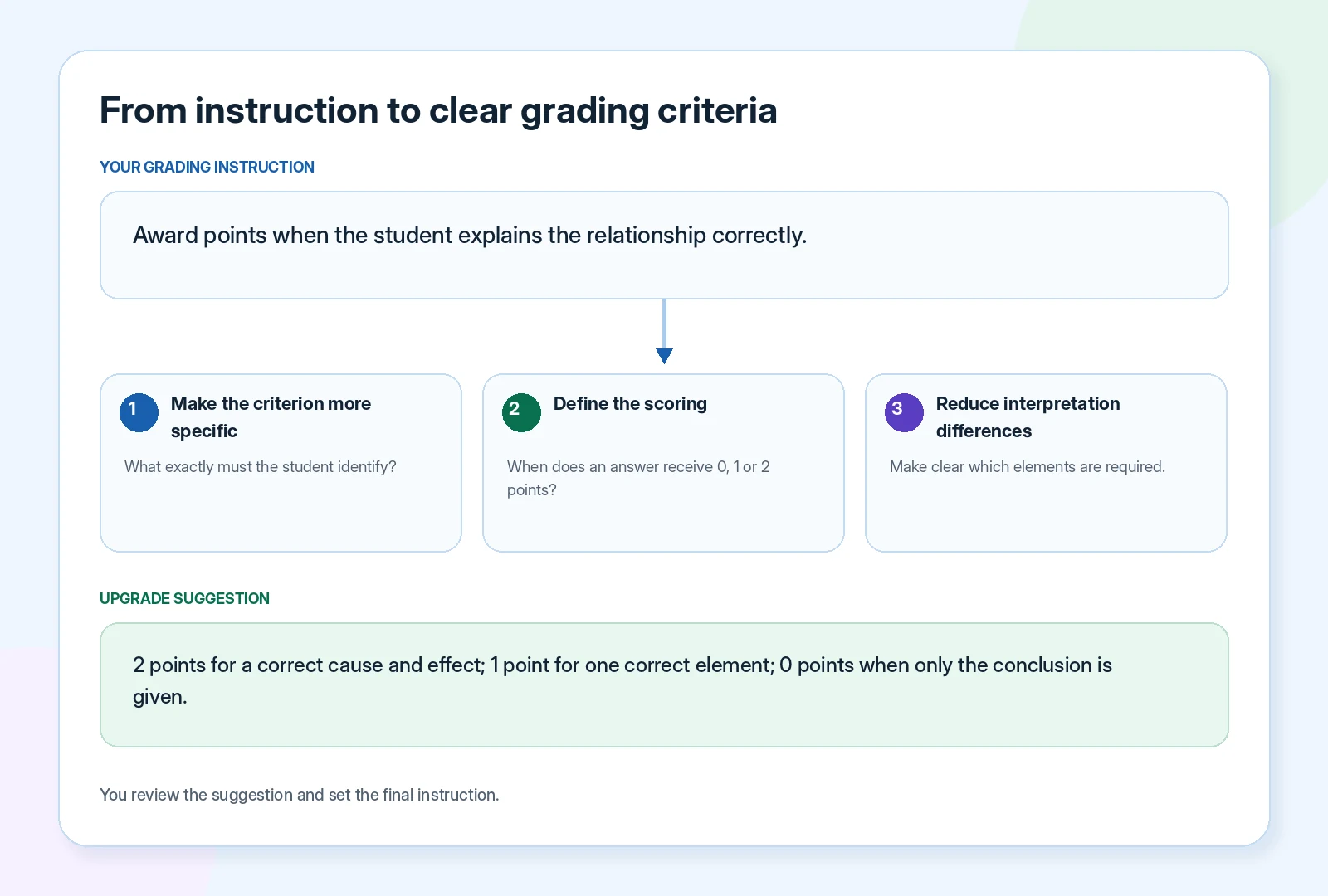
Clearer instructions in. Better suggestions out.
A useful AI proposal starts with a clear answer key. UpGrade helps surface missing criteria, ambiguous wording and unclear scoring. You choose which suggestions to adopt and define the final grading approach yourself.
- Your own rubric, answer key and tone
- Suggestions for clearer grading instructions
- Always adjustable before and during grading
- Human review stays in control
Horizontal grading in answer clusters
Compare consistently. Focus your review.
UpGrade groups similar answers within the same question. You review the scoring proposal per cluster, while unusual, uncertain or unique answers are flagged separately.
Cluster 1
Similar, strong answers with a complete explanation.
Cluster 2
Answers with a partially correct relationship or a missing step.
Edge cases
Unusual or uncertain answers are separated for extra teacher review.
What everyone gets from it
One upgrade. Different benefits.
Teachers gain time and a clearer overview. The school builds more consistent quality. The student receives usable feedback faster.
For teachers
More time for the work only you can do: less repetitive grading, feedback in your own style and always your own final judgment.
For schools
From separate judgments to shared quality: more consistent application of criteria, insight per class, question and topic, and more room for formative work.
For students
From only a grade to a useful next step: clear explanations, personalized improvement points and earlier targeted support.
One improvement creates room for the next
Not just faster grading. More room for what matters.
More efficient grading frees up time. More time enables better preparation and more targeted support. Better insight helps you intervene sooner. What starts with less repetitive work creates more room for better education.
Faster grading.
Repetitive preparation takes less time.
More teaching time.
More room for lesson preparation and support.
More useful feedback.
More students receive a concrete next step.
Earlier class insight.
Patterns and bottlenecks become visible earlier.
From summative to more formative
From showing where a student stands to helping them move forward.
A test does not have to end with a grade. UpGrade prepares feedback in your own style and tone so you can review and adjust it yourself. When results become visible by learning objective, question and class, you can use the outcome to shape the next lesson and the student’s next step.

Technology expands what is already possible
Keep what works. Expand what is possible.
The core does not change. Good technology adds reach, information and room.

From home to everywhere
Music that moves with you.
The love of music stays the same; when and where you listen becomes more flexible.

From planning ahead to adjusting on the way
A route that adapts as you go.
The destination stays the same. Live traffic and warning information help along the way.
From grading hours to teaching time
More room to explain again.
The teacher’s judgment remains central. The time gained goes back to the classroom.
Your time savings
Calculate how much time you could save.
Adjust the sliders to match your situation. The estimate shows how much grading time you could save each month at the selected savings percentage.
Average grading time per student, per assessment.
Estimated monthly time savings
Indicative estimate. Actual time savings depend on subject, answer type, grading instructions and teacher review.
Frequently asked questions
Clear before you begin.
What kinds of tests is UpGrade for?
UpGrade is designed for written tests and assignments with open and subject-specific answers. Think of handwritten text, calculations, graphs, diagrams, molecular structures and custom answer forms.
Do I need to work with a standard test or fixed rubric?
No. You use your own test, answer key, rubric and grading approach. UpGrade helps make the grading instructions concrete and usable before grading starts.
Does UpGrade replace the teacher’s judgment?
No. UpGrade prepares a grading suggestion and draft feedback. You review, adjust and finalize the result. AI supports; the teacher decides.
How accurate is the assessment?
The quality depends on how concrete the answer key or rubric is. The clearer the assessment criteria, the more useful the proposal. That is why we prefer to use your own test and answer key in the demo.
Can UpGrade show class-level insight?
Yes. Results can be shown per class and per question, so patterns become visible faster: which question went well, where a group got stuck and which topic needs more attention.
Does UpGrade work with handwritten work?
That depends on readability and how the work is submitted. During a demo, we can test this with an example from your own material.
Are test data used to train general AI models?
Your tests, answers, rubrics and feedback are not used to train our general AI models. Processing, retention and deletion arrangements are documented.
How do I start with UpGrade?
Request a demo and bring a test, answer key or rubric. After the demo, the next step is usually a pilot with a small group of teachers before broader rollout.
Ready for the next step?
More control over grading. More room for teaching.
Bring your own test, answer key or rubric. That way, the demo is grounded in your own practice rather than a generic example.